





On this page
Serpentine is a sans-serif typeface with small triangular swellings at the ends of its strokes. Dick Jensen designed it in 1972. It works best in headlines, short titles and signs, where the details have room to show.
About the Serpentine font
The Serpentine family includes Light, Medium and Bold weights, plus oblique (slanted) versions of each. You can pick the weight that fits your text and keep the same shapes across the set.
The swellings at the stroke ends make it look like a sans serif with a hint of serif. That small detail is what sets it apart from plain sans-serif fonts like Arial.
Designers often choose Serpentine when a title should feel modern without looking cold. The swellings add a little character, and the letters stay clean and easy to scan.
Font View
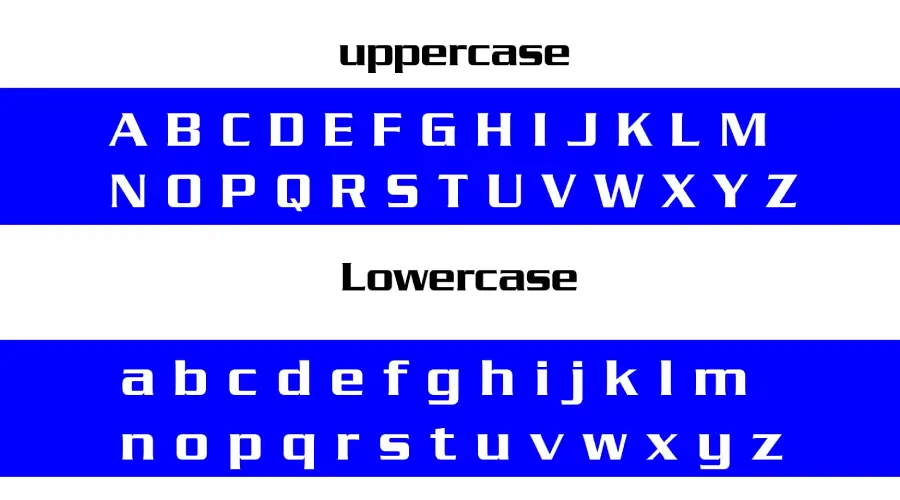
The images below show the characters and symbols in the family.


Serpentine Font Generator
Type your own text in the tester below and compare Light, Medium, Bold, Bold Italic and Bold Oblique side by side. Change the size, color and background to see how each style looks in your layout.
-
Serpentine Medium Preview only
- Format
- OTF
- Licence
- Commercial licence: preview only
Serpentine Font -
Serpentine Bold Preview only
- Format
- OTF
- Licence
- Commercial licence: preview only
Serpentine Font -
Serpentine Light Preview only
- Format
- OTF
- Licence
- Commercial licence: preview only
Serpentine Font -
SerpentineEF BoldItalic Preview only
- Format
- OTF
- Licence
- Commercial licence: preview only
Serpentine Font -
Serpentine BoldOblique Preview only
- Format
- OTF
- Licence
- Commercial licence: preview only
Serpentine Font
When you are ready, use the button below to get the full family.
How to use Serpentine font
On Windows, download the font files, right-click the file you want and choose Install. On a Mac, double-click the file and select Install Font in Font Book. Restart your design app if the font does not appear in its list.
Before you choose Serpentine, compare it with a plain sans. If you want clean shapes without the swellings, try Futura or Avenir.
In Canva, search the font list for Serpentine first. If it is missing and your plan allows uploads, upload the font file. If not, type the text in a desktop app, save it as a PNG and place that image in Canva.
Serpentine suits short titles, posters and signs. Keep long paragraphs in a plainer font, because the swellings are easiest to see at large sizes. Test the Light and Bold weights at the size you plan to print before you commit to one. Light looks best with generous space around it, while Bold holds up better on busy backgrounds.
If you plan to use it on products or in a logo for a client, check the license first.
Fonts similar to Serpentine
If Serpentine is not the right fit, these pages on this site cover sans-serif fonts with a clean look:
FAQ
What is the Serpentine font?
Serpentine is a sans-serif family designed by Dick Jensen in 1972. Its stroke ends have small triangular swellings, which give it a semi-serif look.
How do I download the Serpentine font?
Use the Download Full Family button on this page. Open the download, then install the styles you need. Check the license before you use the font in paid or commercial work.
Can I use Serpentine for commercial work?
Check the license first. The license decides whether you can use the font on products, merchandise or client logos.