

On this page
“Chinese font” means two different things: a font that can set Chinese characters, or a Latin font made to look Chinese. This page covers the first meaning in full and the second briefly.
Quick answer: To write Chinese you need a font with Chinese glyphs. Noto Sans SC, Noto Serif SC, LXGW WenKai and Source Han Sans are all free under the SIL OFL. Skip “Chinese-style” Latin fonts.
Can I use it?
| Question | Answer |
|---|---|
| Personal use | Yes. Every font on this page is free to download and use for personal work. |
| Commercial use | Yes. All five are under the SIL Open Font License, so you may use them in products you sell. You may not sell the font files by themselves. |
| Where to get it legally | Ma Shan Zheng downloads from this page. The four large families link to their official Google Fonts or GitHub pages, because the files are 14 to 26 MB. |
Fonts for writing Chinese
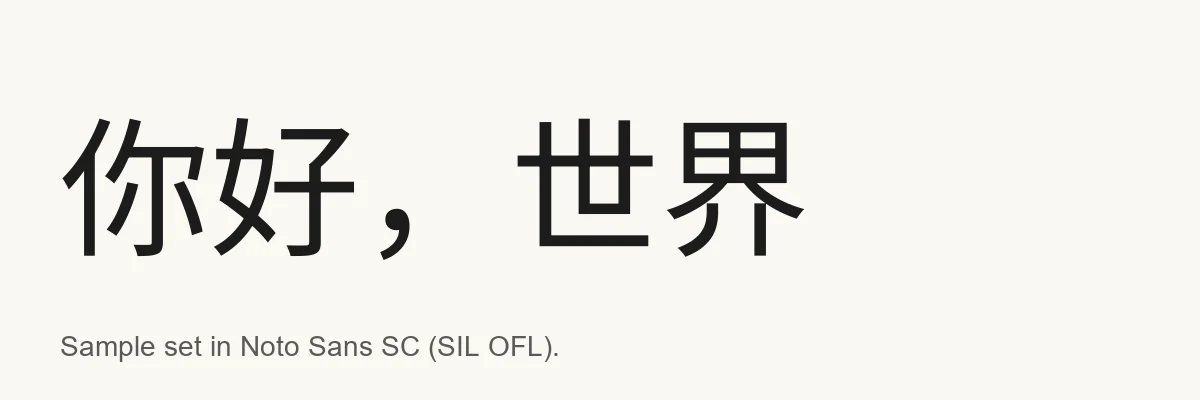
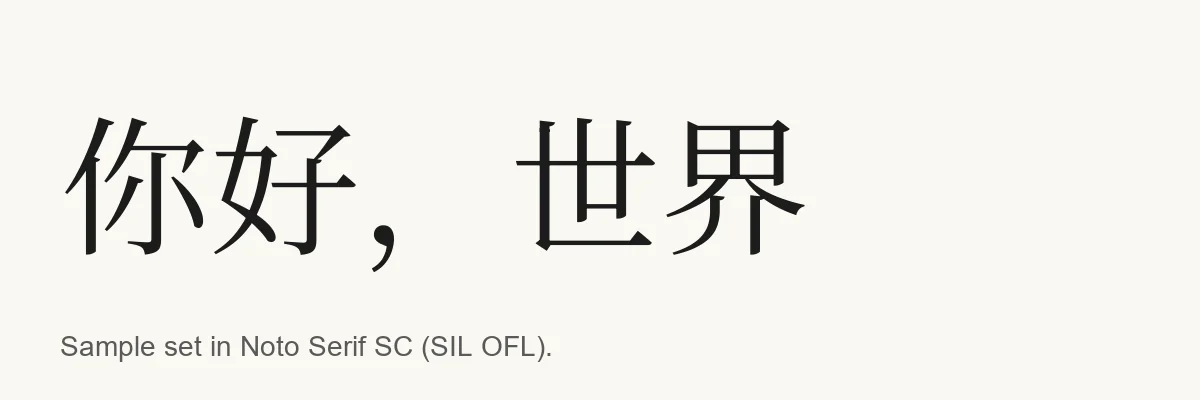
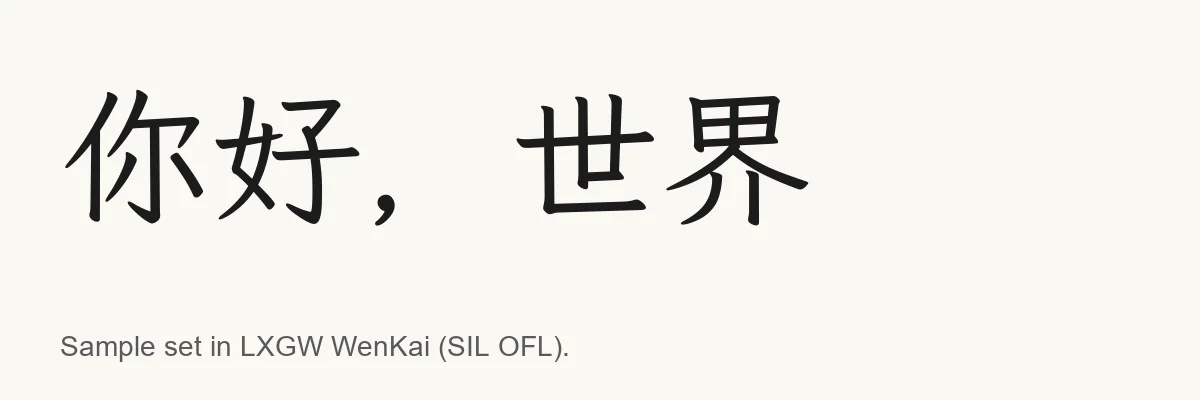
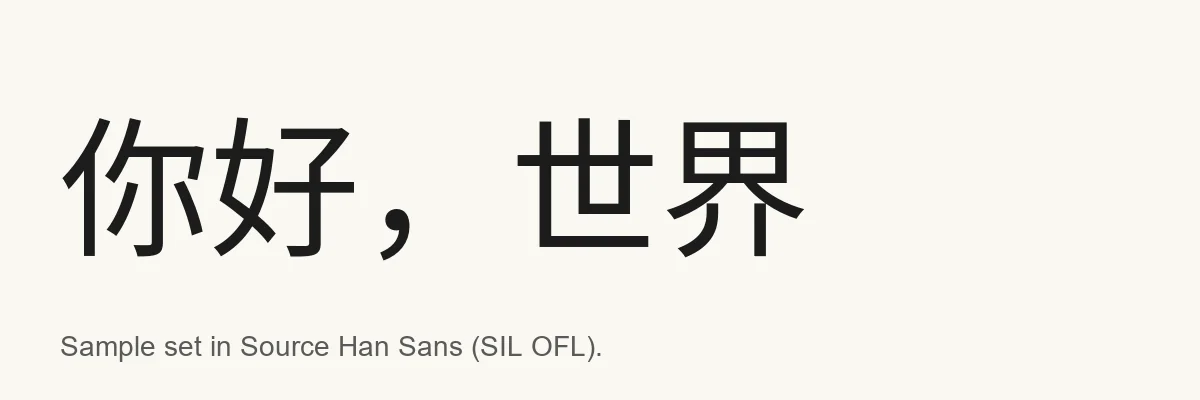
A Latin font holds a few hundred to a few thousand glyphs. By our count of the files, Noto Sans SC holds about 31,000 glyphs and Source Han Sans SC about 65,000, so the downloads are big. We measured the official files on November 29, 2026: Noto Sans SC is about 18 MB, Noto Serif SC about 25 MB, Source Han Sans SC (one weight) about 17 MB, and LXGW WenKai about 26 MB. Its Lite version is about 14 MB.
That is too heavy to preview on a phone, so those four are link cards with a sample we set ourselves. Each button sends you to the official source. The brush font below is small enough to host, at about 6 MB.
-
Noto Sans SC Get it from Google
- Format
- WEBP
- Licence
- Free for commercial use. We link to the author instead of hosting the file.
- Made by
- Download from
- fonts.google.com
-
Noto Serif SC Get it from Google
- Format
- WEBP
- Licence
- Free for commercial use. We link to the author instead of hosting the file.
- Made by
- Download from
- fonts.google.com
-
LXGW WenKai Get it from LXGW
- Format
- WEBP
- Licence
- Free for commercial use. We link to the author instead of hosting the file.
- Made by
- LXGW
- Download from
- github.com
-
Source Han Sans Get it from Adobe
- Format
- WEBP
- Licence
- Free for commercial use. We link to the author instead of hosting the file.
- Made by
- Adobe
- Download from
- github.com
-
Ma Shan Zheng Download font Open in Studio
- Format
- TTF
- Licence
- Free for commercial use
- Made by
- Ma ShanZheng
- Source
- fonts.google.com
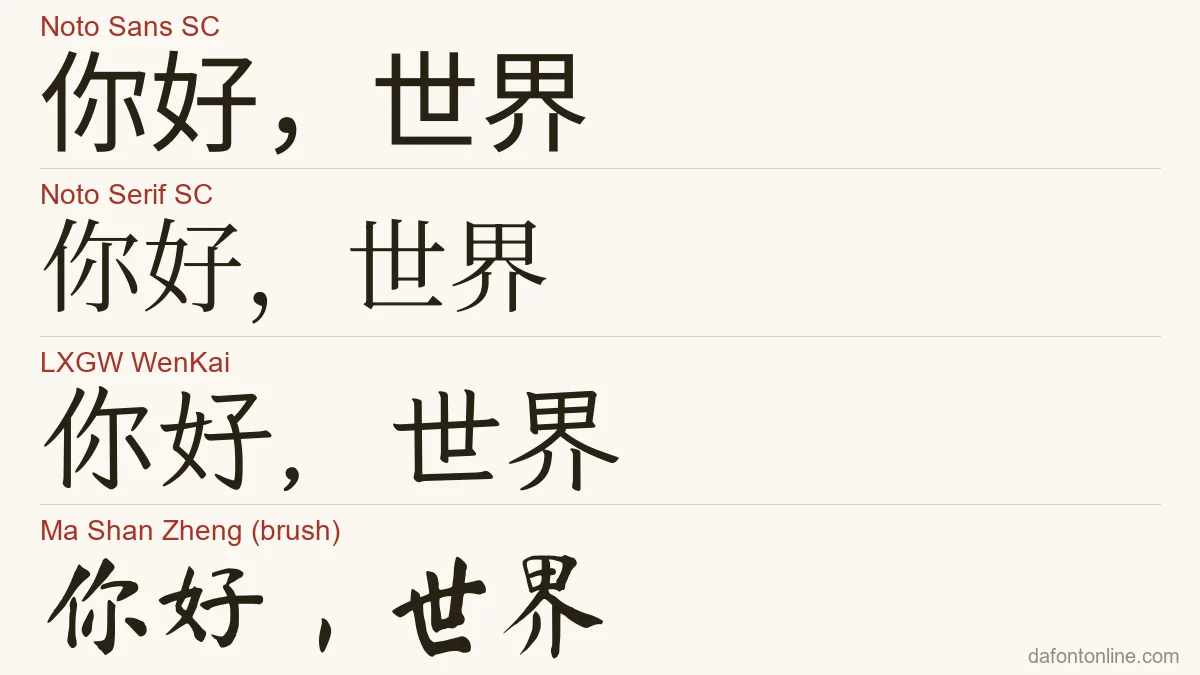
你好,世界 Hello
How to choose
| You need | Pick | Why |
|---|---|---|
| Simplified Chinese, screen text | Noto Sans SC or Source Han Sans SC | SC is the Simplified Chinese version. The copyright line inside the Noto Sans SC file names Adobe and the reserved name “Source”, which points to a shared design with Source Han Sans. |
| Traditional Chinese | Noto Sans TC | TC is the Traditional Chinese version. We checked the file: it has about 21,000 glyphs and is about 12 MB, smaller than the SC file. |
| Long reading, print | Noto Serif SC | A serif face with a book feel. It is the largest file on this page, so use it in a document, not on a web page. |
| A warm, handwritten feel | LXGW WenKai | The project page says it is derived from Fontworks’ Klee One. It has a pen-written look, but it is still easy to read. |
| A brush look | Ma Shan Zheng | A brush-written Chinese font from the Ma Shan Zheng project, with ZhongQi named as designer in the file. By our count it has about 7,000 glyphs, far fewer than Noto Sans SC, and it is small enough to host here. |
| A website | A Lite or subset font, not the full file | The LXGW project offers a Lite version with fewer rare characters so developers can embed it in software, and points to a separate issue thread for websites. |
Sources: LXGW WenKai on GitHub, Source Han Sans on GitHub, Noto Sans SC on Google Fonts. Glyph counts and file sizes are our own checks of the downloaded files.
What each font is
| Font | Maker | Licence | Size we measured |
|---|---|---|---|
| Noto Sans SC and TC | Google, with Adobe credited in the file | SIL OFL 1.1 | SC about 18 MB, TC about 12 MB |
| Noto Serif SC | Google, with Adobe credited in the file | SIL OFL 1.1 | About 25 MB |
| LXGW WenKai | LXGW, derived from Klee One by Fontworks | SIL OFL 1.1 | Full about 26 MB, Lite about 14 MB |
| Source Han Sans | Adobe | SIL OFL 1.1, reserved name “Source” | About 17 MB for one weight |
| Ma Shan Zheng | Ma Shan Zheng project (ZhongQi) | SIL OFL 1.1 | About 6 MB |
We read the licence text in each file or repository. The LXGW repository adds a warning: selling a single OFL font file on its own breaks the licence, and it asks people not to buy such listings. These fonts are free from the sources linked here.
Use a Chinese font in Word or Canva
- On Windows, right-click the downloaded file and choose Install. On a Mac, double-click it and choose Install Font in Font Book. Restart your design app if the font is missing from its menu.
- In Word, type your Chinese text, select it and choose the new font from the Font box. If you see empty boxes, the font does not include those characters.
- In Canva, open Brand from the home screen, choose Fonts, then Upload a font. Canva’s help page says uploads need Canva Pro, Teams, Business, Education or Nonprofits.
- Save a PDF with embedded fonts if you send the file to someone, so the Chinese text does not turn into boxes on their computer.
We did not test these steps in Word or Canva. The Canva step follows Canva’s help page.
“Chinese-style” Latin fonts
Many people also search for a font that makes English letters look Chinese. These are called chop suey, wonton or chopstick fonts. They are widely seen as a stereotype, so we do not host any of them.
- Wikipedia says the first commercial typeface of this style was made in 1883 by the Cleveland Type Foundry, called “Chinese” and renamed “Mandarin” in the 1950s.
- CNN quotes the design historian Paul Shaw, writing in Print: “Neither the food nor the fonts bear any real relation to true Chinese cuisine or calligraphy.”
- Wikipedia adds that some Asian Americans find these fonts funny, and others find them offensive. They are most often criticised when paired with caricatures.
- CNN also notes that some Chinese immigrant restaurants used the style themselves in the 1930s, to look exotic to customers.
If you want a Chinese look, use real Chinese type. A brush font such as Ma Shan Zheng writes actual Chinese characters in a brush style. If you need Latin letters only, a neutral brush or script font is a safer choice than a wonton font.
Sources: Wikipedia: Wonton font, CNN Style: the end of chop suey fonts.
FAQ
What is the best free Chinese font?
For Simplified Chinese text, Noto Sans SC or Source Han Sans SC. Both are under the SIL OFL, which allows commercial use.
What is the difference between SC and TC?
SC is the Simplified Chinese version of a font and TC is the Traditional Chinese version. The two sets differ in glyph count and file size.
Why are Chinese font files so big?
They hold tens of thousands of characters. We counted about 31,000 glyphs in Noto Sans SC.
Can I use Noto Sans SC commercially?
Yes, it is under the SIL Open Font License. You may not sell the font file by itself.
What font looks Chinese in English?
Chop suey or wonton fonts, but many people regard them as a stereotype. We suggest real Chinese type or a neutral brush font.
For text I would pick Noto Sans SC if the file size does not matter, and LXGW WenKai for anything meant to feel written by hand. The brush look on this page comes from Ma Shan Zheng.
Related
Noto is a trademark of Google, and Source is a trademark of Adobe. DaFont Online is not affiliated with Google, Adobe or the makers of the other fonts named here.