

On this page
MLA Style, from the Modern Language Association, does not name one font for a paper. It asks for a readable typeface at a standard size, and your instructor’s rules come first.
Quick answer: MLA does not require one font. Use an easily readable typeface at a standard size, 12 points is the usual choice. Times New Roman is only an example. Tinos is a free look-alike.
Can I use it?
| Question | Answer |
|---|---|
| Personal use | Yes. Tinos and Liberation Serif are fine for any MLA draft, and they keep the line breaks of Times New Roman. |
| Commercial use | Yes. Both are under the SIL Open Font License. Times New Roman is a Microsoft and Monotype font, and we do not host it. |
| Where to get it legally | Times New Roman comes with Word. The two free fonts are in the tester below. |
What the MLA Style Center says
The MLA Style Center’s “Formatting a Research Paper” page says:
Always choose an easily readable typeface (Times New Roman is just one example) in which the regular type style contrasts clearly with the italic, and set it to a standard size, such as 12 points.
The same page tells you not to justify the lines at the right margin, to turn off automatic hyphenation, and to double-space the entire paper, including quotations, notes and the works-cited list. It also asks for half-inch indents on the first line of a paragraph and on set-off quotations.
One caution. That PDF is marked “From the MLA Handbook, 8th ed.” The 9th edition (2021) is the current one. The Boston College library guide, which says it follows the 9th edition, gives “an easily readable and common typeface (e.g., Times New Roman) in 11 to 13 point font.” Our fetcher could not open the MLA Style Center’s live “Formatting Papers” page, so the 11 to 13 range is Documented through the library guide and not through MLA’s own site. On the question of whether Times New Roman is required, an MLA Style Center answer (written for the 8th edition) says plainly: “We don’t require the use of Times New Roman or any other font.”
Free fonts that match the layout
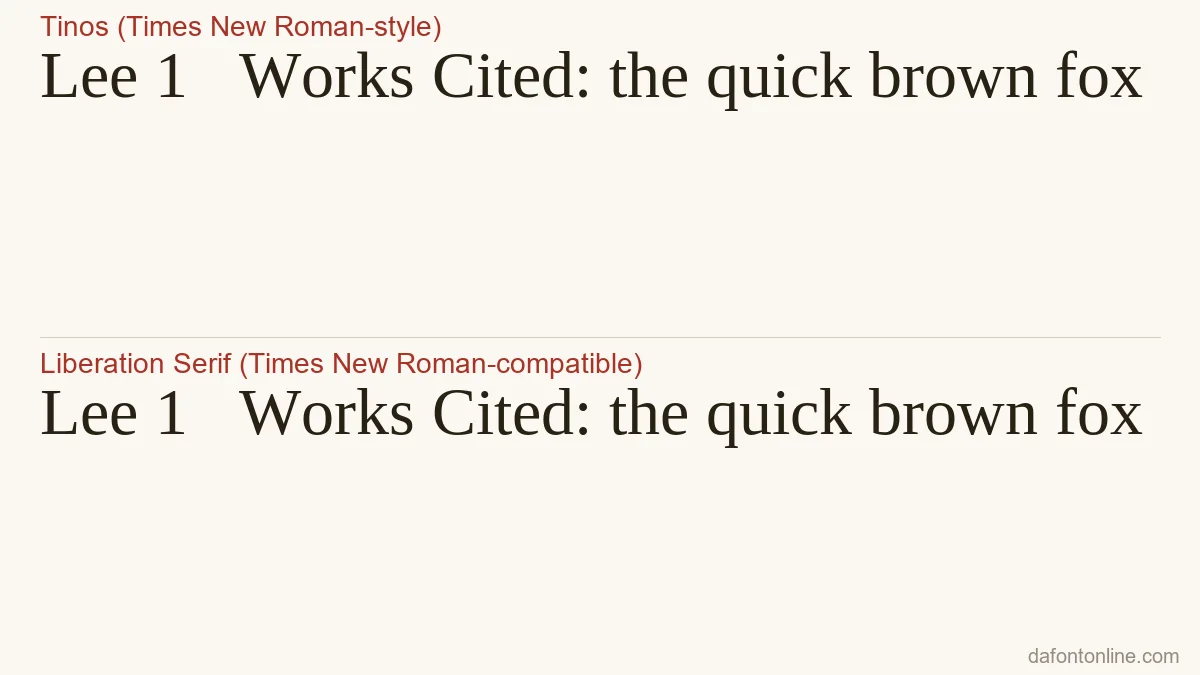
Liberation Fonts say they aim to provide “document layout compatibility as usage of Times New Roman, Arial, Courier New”. Tinos is the Google Fonts version of the same design family. If you write in Google Docs or on Linux, either one keeps a Times New Roman page count close.
-
Tinos Download font Open in Studio
- Format
- TTF
- Licence
- Free for commercial use
- Made by
- Steve Matteson
- Source
- fonts.google.com
Lee 1 Works Cited -
Liberation Serif Download font Open in Studio
- Format
- TTF
- Licence
- Free for commercial use
- Made by
- Liberation Fonts project
- Source
- github.com
Lee 1 Works Cited
Who uses which font
| Style | Font rule | How sure |
|---|---|---|
| MLA | An easily readable typeface at a standard size such as 12 points. No single font is required. | Documented: MLA Style Center. |
| MLA, size range | 11 to 13 points. | Documented: Boston College library guide, citing the 9th edition. |
| Free match for Times New Roman | Tinos or Liberation Serif. | Documented for Liberation’s aim. Tinos is our match by eye. |
Sources: MLA Style Center: Formatting a Research Paper, MLA Style Center: Times New Roman is a boring font, Boston College Libraries: MLA 9 Quick Guide, Microsoft Support: Change the default font in Word, Google Docs Help: change the font, Liberation Fonts on GitHub.
MLA or APA: what changes for the font
| MLA 9 | APA 7 | |
|---|---|---|
| Fonts named | None. Any easily readable typeface; Times New Roman is an example. | A list: for example 12-point Aptos, 11-point Calibri, 11-point Arial, 12-point Times New Roman, 11-point Georgia. |
| Size | A standard size such as 12 points; the 9th edition guide above gives 11 to 13. | Set by the font you pick, from 10 to 12 points. |
| Source | MLA Style Center and MLA Handbook. | apastyle.apa.org. |
The APA column comes from our APA font page, which quotes the official APA Style list. The practical difference: APA hands you a menu, and MLA hands you a test. Is it readable, does the italic stand apart from the regular style, and is the size normal? Times New Roman 12 passes all three, which is why most guides suggest it.
Set the MLA font in Word
- On the Home tab, open the Font dialog with the small arrow at the bottom right of the Font group, or press Ctrl+D.
- Pick the font and a size such as 12.
- Click Set As Default, then choose “All documents based on the Normal template”, and click OK twice.
- Open the Paragraph dialog and set Line spacing to Double, with 0 pt before and after. MLA asks for double spacing throughout.
Steps 1 to 3 follow Microsoft Support. Step 4 follows the MLA instruction to double-space. Word updates can reset defaults, so check a new document.
Set the MLA font in Google Docs
- Pick your font and size in the toolbar. Google’s help page says you can make a new font the default.
- Select some text, open Format, then Paragraph styles, then Normal text, and choose Update Normal text to match.
- Open Format, Paragraph styles again, choose Options, then Save as my default styles.
- Set Line spacing to Double from Format, then Line and paragraph spacing.
We did not retest these Google Docs menus, and Google can rename them. Tinos is listed on Google Fonts, so look for it under More fonts in the font menu. Liberation Serif is not a Google Font, so it only works in Word or another app on your own computer.
Free look-alikes, best first
Tinos (closest free Times New Roman match, free for commercial use). Steve Matteson’s serif under the OFL. It follows the Times New Roman design closely.
Differences: Small differences in the shape of some letters, such as the g and the R. The line breaks should stay the same.
Compared by eye on our specimen.
Liberation Serif (same aim, free for commercial use). Red Hat’s metric-compatible Times New Roman replacement, under the OFL.
Differences: Its letters differ from Times New Roman in small ways. It uses the same widths, so a document keeps its page breaks.
Documented by the Liberation README.
If your instructor asks for Times New Roman by name, submit with Times New Roman. A look-alike changes the font name in the file, and a strict grader or an automatic checker may notice.
Install a free font on your computer
- On Windows, right-click the downloaded file and choose Install. On a Mac, double-click it and choose Install Font in Font Book. Restart your word processor if the font is missing from its menu.
- In Word, choose the font from the Home tab list and set the size to 12.
- If you share the file, embed the font: File, Options, Save, then Embed fonts in the file. Otherwise another PC will swap it for a default.
FAQ
What font does MLA use?
MLA does not require one font. It asks for an easily readable typeface at a standard size such as 12 points. Times New Roman is only an example.
What font size does MLA use?
The MLA Style Center says a standard size, such as 12 points. A library guide that follows the 9th edition gives 11 to 13 points.
Is Times New Roman required for MLA?
No. The MLA Style Center says it does not require Times New Roman or any other font.
Is there a free font like Times New Roman for MLA?
Tinos and Liberation Serif are free under the SIL OFL, and Liberation says it aims for Times New Roman layout compatibility.
If your instructor gives no rule, I would take Times New Roman 12 if you have it, and Tinos 12 if you do not. For more pairs like these, see Free font alternatives.
Related
- APA font: accepted fonts and sizes
- Times New Roman font
- Free font alternatives
- Arial font
- Calibri font
MLA Style is a trademark of the Modern Language Association. DaFont Online is not affiliated with the MLA, Microsoft or Monotype.