

On this page
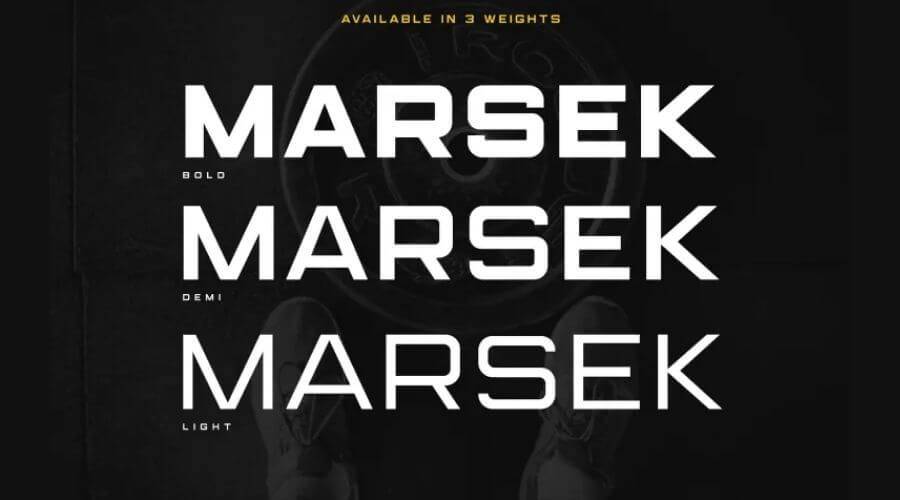
Marsek is a sans serif font made by MOCOSANS. It comes in three weights: Bold, Demi and Light. The font is free for personal use, so check the license before you use it in commercial work.
About the Marsek font
Marsek is built for large text. Its letters are sturdy and stylish, so they work best in headlines, titles, single characters and short lines of description. MOCOSANS created the family and made it available for download.
The three weights give you room to mix styles. Pair Bold with Light for a title and a subtitle, or use Demi when you want a middle level of weight. The shapes have a distinct, elegant feel that can help a project stand out.
Marsek works on Windows, Mac and Linux. It is also listed as compatible with cutting machines such as Cricut and Silhouette, which makes it useful for vinyl and craft projects. The files come as OTF and TTF, so most design programs can read them.
Marsek Sans Serif Font View

Marsek font information
| Name | Marsek Sans Serif Font |
| Style | Sans-Serif Typeface. |
| Designer | MOCOSANS |
| File Format | OTF,TTF |
| Font Licence | Free for Personal use. |
| Type | Freeware Version. |
How to use Marsek font
On Windows, download the zip file and extract it. Right-click the font file and choose Install. On a Mac, double-click the font file and select Install Font in Font Book. Restart your design app if Marsek does not appear in its menu.
Marsek suits logos, wall signs, cards, posters, flyers, banners and t-shirts. It also looks good on a magazine cover. Dark backgrounds, especially black, make the letters stand out.
To reach the alternate characters, use a program that supports OpenType features. Adobe Illustrator CS, Adobe InDesign and CorelDraw X6 and X7 are examples.
In Canva, check the font list first. If Marsek is not there and your plan allows uploads, upload the file yourself. Otherwise, save your text as a PNG from a desktop app and place that image in Canva.
License information
Marsek is listed as free for personal use. A commercial license is strongly advised for commercial use, such as products, client work or paid projects. Check the terms before you use the font in any of those cases.
To buy a commercial license, use this link: Buy Marsek on Creative Market.
Fonts similar to Marsek
If you want other sans serif options, these posts are worth a look:
Open each page to compare the letter shapes with your text before you choose one.
FAQ
Is Marsek font free to download?
Marsek is free for personal use. For commercial work, buy a commercial license before you use it on products or for clients.
Where can I download Marsek font?
Use the Marsek Font Download button on this page. The file is a zip, so extract it before you install the font.
What file formats does Marsek come in?
Marsek comes in OTF and TTF formats for its Bold, Demi and Light weights.
Can I use Marsek with a cutting machine?
Yes, the font is listed as compatible with Cricut and Silhouette machines. Cut a small test first to check the letter spacing.