


On this page
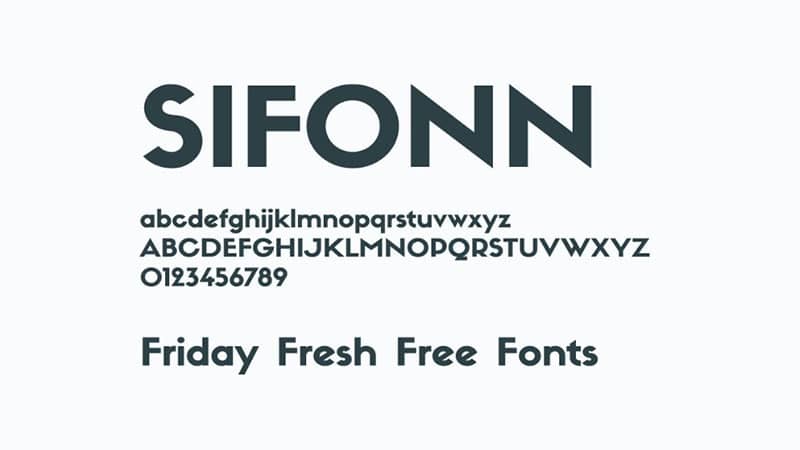
Sifonn is a sans serif font designed by Rafa Goicoechea. Its plain shapes suit headings and short text. The download, font details and license notes are below.
About the Sifonn font
Designers reach for sans serif fonts when they want a direct, uncluttered look. Sifonn fits that role in posters, slides, simple logos and social posts.
The font comes as OTF and TTF files, so most computers and design apps can load it. A sans serif also stays easy to read at small sizes, which helps with captions and menus.
Font info Table
| Name | Sifonn Font. |
| Style | Sans-serif. |
| Designer | Rafa Goicoechea. |
| File Format | OTF, TTF |
| Font Licence | Free For Personal Use. |
| Type | Freeware Font. |
Font View
License Information
Sifonn is listed as free for personal use. Read the license file in the download before you use it in paid work or on a product. The buy button above goes to the designer’s own site, where you can check the commercial terms.
How to use Sifonn font
On Windows, unzip the download, right-click the .otf or .ttf file and choose Install. On a Mac, double-click the file and select Install Font in Font Book. Restart your design app if Sifonn does not appear.
In Canva, search for Sifonn in the font menu. If you do not see it and your plan allows uploads, upload the file. If not, export a PNG from a desktop app and place it in Canva.
Sifonn works well for headings and short labels. For longer text, keep the lines fairly short, around 60 to 70 characters, so readers can follow them without losing their place.
Fonts similar to Sifonn
If you want other clean sans serif options, these posts on this site are a good start:
FAQ
What font is Sifonn?
Sifonn is a sans serif font designed by Rafa Goicoechea. It comes as OTF and TTF files.
Is Sifonn free for commercial use?
The license is listed as free for personal use. Check the license file in the download before you use Sifonn in paid work.
How do I install Sifonn on Windows or Mac?
Unzip the download, then install the font file. On Windows, right-click it and choose Install. On a Mac, use Font Book. The steps are in the section above.